
Mutation Testing
aka Testing Your Tests (and how to do so)
In the present era of AI, we can pump out hundreds of shiny looking unit tests in less time than it took to read this sentence.
I might be known for the occasional exaggeration.
On the surface, these might look great. As developers, we promise that we've looked at them. We promise they're great. The green tick showed up when we ran them. And they are great, right?
Well, it's more complicated than that. It also goes without saying you don't need AI to write low quality tests. We can do that easily enough ourselves sometimes :)
How can we confirm and actually show that our tests are useful, consistently and with high confidence? Isn't that the ten million dollar question, that your tests provide some real value, at the very least catching regressions?
Code coverage is measuring what code was run (therefore covered) by our unit tests. It doesn't say anything about the quality or value in your tests.
Test coverage in the era of AI has become easier than ever to get, so it's important for us to ensure there is real value out of that coverage, otherwise, test suites can become performative.
Performative test suites mean you can't trust those tests on that new release you're running. You then might defer a lot of responsibility to more expensive forms of testing like end to end or canary testing.
The Solution
Mutation testing is the act of intentionally introducing faults into code, and verifying if unit test suites catch the regressions by failing the mutated code. Can your tests actually catch bugs? This is the proof.
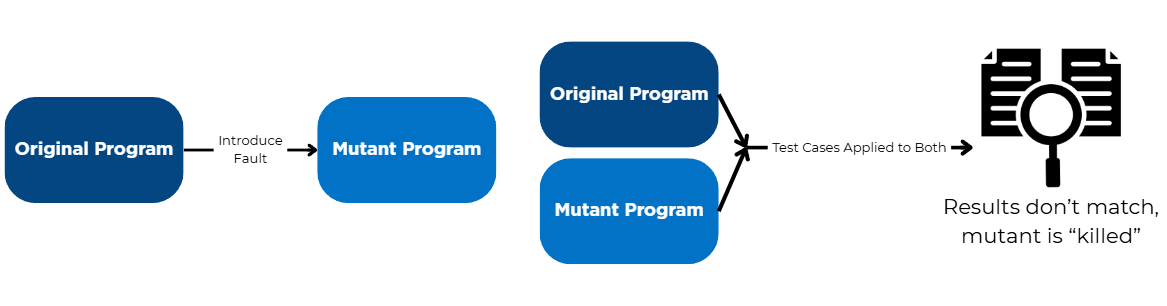
Mutation tests give us a measure of the effectiveness of tests, and help us surface missing assertions.
Let's consider a super simple case where you have a method checking if someone is legally considered an adult (at least in many countries):
If we had asked an AI to generate tests to confirm our isAdult method works, here's what that could look like:
Okay. We ran our tests, the magical green ticks have appeared, and they are correct, with basically 100% code coverage.
Now, consider what happens if we "mutate" this code, by changing its condition in an undesired way:
Uh oh. Now we're in trouble, because we've introduced a bug. Surprise, our tests continue to be oh so beautifully green. Our test coverage didn't catch the regression.
If tests catch mutated code by failing, congratulations, your tests have "killed a mutant". Otherwise, oh no, the mutant survived, and your test didn't do its job!
Worse yet, your tests may not have been covering a mutant, you had a gap in test coverage! This allowed a mutant to slip by undetected.
The more mutants you catch, the more value your tests provide in preventing regressions and catching bugs.
Let's bring our scenario up notch, to a more common one I've seen and sometimes fallen victim to its temptations.
Over Mocking
Developers. Developers... Developers....
Sorry Steve, I needed to borrow that one.
Writing tests, we tend to like mocks. Sometimes too much. This is known as "over-mocking". You can end up mocking the system under test itself, or mocking so aggressively that basically no logic is being tested.
Let's define over mocking as not just using mock frequently, but also using it poorly. This is an easy way to end up with tests that look great but have little value.
Ever made a breaking change and noticed unit tests still pass? Overmocking.
Let's take a look at something a little more familiar:
Straightforward enough, we've got a class that registers an email as an active user, and sends a welcome email.
Here's a test that could be written for that:
Our test is checking that the
In a mutation test, we could flip the boolean assignment to false in our user variable:
Our test will continue to pass. Our mocks don't care that IsActive is false and didn't catch the bug. They looked pretty enough with big code coverage, but didn't catch a big problem.
We now know that we can extend our test to fully protect that critical logic:
The Point
Now, at this stage, you may be thinking, "Gee, sounds nice Bob, but ain't that a lotta work?" To that my friend, I'd say you'd be right, and, who the hell is Bob?
Back in Ye Olden Day without fantastic open source software, one might imagine a Dark Age where one intentionally spent frivolous amounts of time adding bugs to code, manually checking and recording if unit tests caught anything.
Okay, at a small scale, maybe that's not terrible. The issues lie therein, this simply cannot scale, and it's non-deterministic.
The Good News: Stryker!
What's Stryker you say? Stryker, available at https://stryker-mutator.io is a free, open source mutation testing tool that automatically and deterministically mutation test your code. Stryker has official support for JavaScript, TypeScript, C# and Scala, and is test runner agnostic. The Dark Ages are over.
Transparency: this post was not made with any sponsorship, partnership or collaboration with the Stryker team. We just liked Stryker.
Stryker automatically "mutates" (introduces faults into) your code, runs your tests before and after, compares the results, and provides you a brilliant, interactive report with a heap of details, all while being very fast and easy to run. Here's an example of a report generated from one of our projects: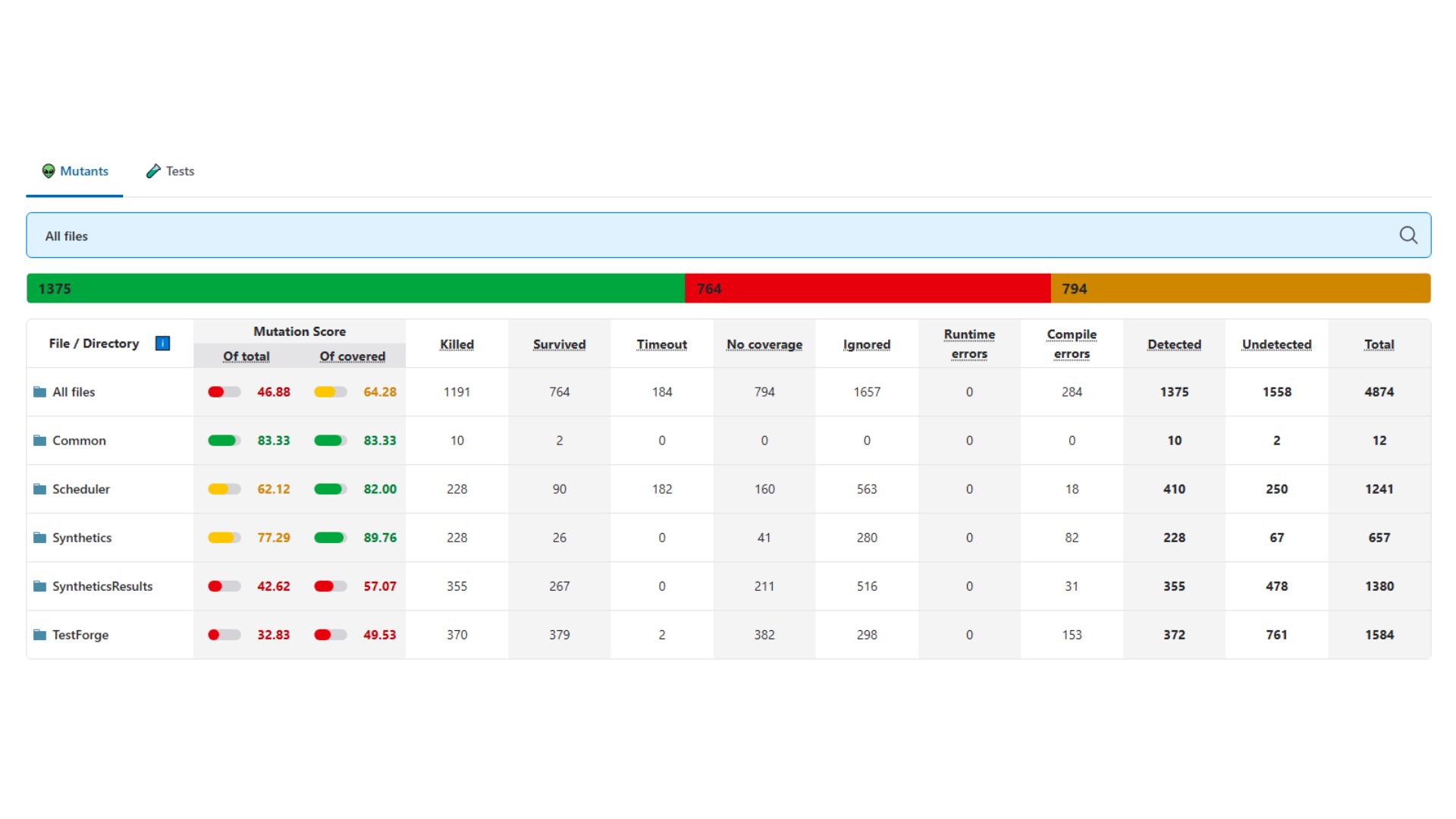
The reports generated are interactive, and highlight the mutants and code for you. Like the sound of that? There's actually interactive dashboards you can play around with at https://dashboard.stryker-mutator.io/reports/github.com/stryker-mutator/stryker-net/master#mutant
Not only does Stryker give us this report, it gives us a deterministic score which we track and improve, of the total number of mutants we killed, and of the total number of mutants we covered.
What sort of mutations does Stryker automatically add? Here's a curated sampling taken from the well documented Stryker.Net at https://stryker-mutator.io/docs/stryker-net/mutations/
| What it Does / Example | |
|---|---|
| Arithmetic Operators | Changes `+` ↔ `-`, `*` ↔ `/`, `%` → `*` |
| Equality Operators | Mutates comparisons: `>=` → `>`, `>` → `<`, `==` ↔ `!=` |
| Logical Operators | Swaps logical ops: `&&` ↔ `||`, `^` → `==` |
| Boolean Literals | Flips booleans: `true` ↔ `false`, and negates conditions |
| Unary/Update Operators | Mutates unary ops and increments: `++` ↔ `--`, `-x` ↔ `+x` |
| Assignment Operators | Mutates compound assignments: `+=` ↔ `-=`, `*=` ↔ `/=`, `??=` → `=` |
| Removal Mutations | Removes statements or blocks: `return`, `throw`, method calls |
You can experiment with Stryker to your hearts content at https://stryker-mutator.io/stryker-playground/
Better yet, here's how to go about setting up your own mutation testing using Stryker.Net.
How To Set Up Stryker.NET for Mutation Testing
Taken from the official Stryker.NET documentation: https://stryker-mutator.io/docs/stryker-net/getting-started/ -- see here for the full details.
1. Install prerequisites
Make sure you have the .NET 8 runtime or newer installed so Stryker can run.
2. Install Stryker globally
3. Run Stryker from your test project
Navigate to your unit test project directory, and run:
You're done. That's literally all it takes to get Stryker to mutate your code, run your tests, and generate a report.
Stryker does support more advanced options for local tool installs, custom configurations and more. See their docs for all the good stuff if you're interested.
If Stryker doesn't support your language of choice, the main thing I want to expose you to is that this level of automatic validation is possible, although I have been very happy with Stryker thus far.
A Closing Note,
Mutation tests aren't a silver bullet. They can be quite computationally expensive and therefore take significant time to run. Personally, I have run them periodically as snapshots.
Not every surviving mutant is a smoking gun. Tools like Stryker give us signals to be aware of and monitor. Like code coverage, a goal of 100% is not meaningful. Instead, it is the pursuit of improvement over time. Like many tools in our toolbox on the righteous pursuit of security, quality and reliability;
Used in the right dose, amongst an arsenal of techniques and methods, they become a powerful ally. Mutation tests shine a concrete light on the value of our unit test suites, which otherwise may be very difficult to measure. This has become more important than ever in the era of Generative AI.
Mutation tests can help us sleep better at night, knowing we've got (or don't got) a meaningful line of unit tests playing defence, running everywhere in milliseconds (unless they don't run fast, let's discuss that next time).
That's all folks.